Showing posts with label samsung mobile. Show all posts
Showing posts with label samsung mobile. Show all posts
the New Custom Rom for galaxy s5360 young release now !!! YEAAA...cyanogen mod7


Read More >>


- Download the ROM and the kernel Download
- Flash the kernel
- Copy it to Zip file sdcard
- reboot to Recovery
- Wipe data/cache/everything
- Choose the zip file
- flash it
- tarraaa.....:D


Rom Toolbox pro .apk

ROM Manager
Set minfree values and select from presets


.jpg "Rom Toolbox pro")
Read More >>

free DOWNLOAD here
Features :
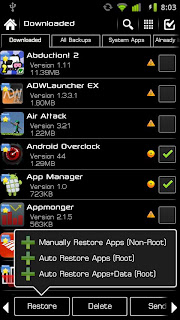
ROM Manager
- Install full ROMs and other zips from a growing list of ROMs
- Create, manage and restore nandroid backups
- Wipe data, cache, dalvik-cache, battery stats
- Install a ROM from your SD card
- Batch backup & restore
- Automatically backup apps when they are installed
- Automatically delete backups when uninstalled (off by default)
- Send backups via gmail/email or dropbox
- Sort backups by already installed, same as installed, older versions, etc.
- Backup/restore app data
- Backup/restore Android Market link
- Task manager
- View memory usage
- Show/hide different processes
- Automated batch uninstaller
- E-mail your apps to friends
- Share with other applications which accept text (SMS, facebook, google reader, etc...)
- Move *any* user app to the SD card
- Freeze/Defrost system & user apps
- Market Doctor (Link *any* app to the Android Market)
- Break market links
- Clean up dalvik-cache
- Zipalign all apks
- Fix permissions on all apps
- Wipe data or cache for apps
- Force close apps
- Access the whole of android's file system (including the elusive data folder!).
- Batch copy/paste, zip, tar, delete, move any file or folder
- Change file permissions and ownership
- View, edit and share files
- Add new files & folders in any directory
- Create and run scripts as root
- Download & run new scripts from an ever-growing list
- Choose to block ads, porn, casino & risky sites
- Add new sites to the hosts file
- Use custom IP
- Select the default install location for apps
- Install custom fonts to your whole device from a list of over 150
- Set fonts as favorites and send them to friends
- Install custom boot animations from over 100+
- Preview boot animations
- Backup & preview your current boot animation
- Change your battery icons in the status bar to a custom one from a list of 150+
- Change your boot logo (splash screen) for supported phones
- View a list of themes for the CM7 theme chooser
- SetCPU and scaling governor
- Apply cpu at boot
- View cpu info
- Easily edit your build.prop
- Change lcd density, improve battery life, increase performance
Set minfree values and select from presets
Apply minfree at boot
SD Boost
Increase the speed of your SD card
Sysctl Tweaks
Easily modify sysctl values
SD Boost
Increase the speed of your SD card
Sysctl Tweaks
Easily modify sysctl values


.jpg "Rom Toolbox pro")

-

This is an update to your firmware with new user interface and tweaks.
This needs to erase all your phone's data to continue. Following are the steps:
How to Install ROM
1.Install Clockwork Mod Recovery From Here
2.Download Rom and Save To Your Sdcard.
3.Boot into Recovery.
4.Do a Data Wipe.
5.Select "Install Zip From Sdcard"
6.Flash Clockwork Mod.
7.Wait for the Rom to be Installed.
8.First Boot Will Take Time be Patient.
9.Enjoy !!


Creed's Rom v2.5 Features :
*Adb/Hard Root - Access to Android Commander
*Soft Root- SU
*Pre Deodexed
*ZipAligned
*Maps With WorldWide Navigation
*Bloatware Removed
*BusyBox Support
*Message App:
-No Auto Sms To Mms Conversion
-No Receipient Limit
-Built In 5 Theme
*Touchwiz App(Samsung Home) :
-Transparency Level Increased
-Alphabetical Auto Arrange
-Landscape Orientation Intoduced
*Auto Brightness Option in Display
*Boot Animation Enabled
*Custom Boot Animation Added
*Custom Power On Sound
*Reduces Startup Time ~Less Than 13 seconds
*14 Status Bar Toggles
-All 5 From Samsung(Wifi,B/T,Soung,GPS,Orientation)
-Data
-Lockscreen-Off
-FlashLight
-Shut Down Options
-Reboot,Recovery & Download modes
-Airplane Mode
-Brightness
-Auto Synchronise
-Screen Timeout
(Note: Select Your Toggles and their order from Menu>Quick Panel Settings App)
*Swipe To Remove Notification
*ICS Circle Lock (from stock)
*More Bloatwares Removed
*20mb less size that before
This needs to erase all your phone's data to continue. Following are the steps:
1.Install Clockwork Mod Recovery From Here
2.Download Rom and Save To Your Sdcard.
3.Boot into Recovery.
4.Do a Data Wipe.
5.Select "Install Zip From Sdcard"
6.Flash Clockwork Mod.
7.Wait for the Rom to be Installed.
8.First Boot Will Take Time be Patient.
9.Enjoy !!

Creed's Rom v2.5 Features :
*Adb/Hard Root - Access to Android Commander
*Soft Root- SU
*Pre Deodexed
*ZipAligned
*Maps With WorldWide Navigation
*Bloatware Removed
*BusyBox Support
*Message App:
-No Auto Sms To Mms Conversion
-No Receipient Limit
-Built In 5 Theme
*Touchwiz App(Samsung Home) :
-Transparency Level Increased
-Alphabetical Auto Arrange
-Landscape Orientation Intoduced
*Auto Brightness Option in Display
*Boot Animation Enabled
*Custom Boot Animation Added
*Custom Power On Sound
*Reduces Startup Time ~Less Than 13 seconds
*14 Status Bar Toggles
-All 5 From Samsung(Wifi,B/T,Soung,GPS,Orientation)
-Data
-Lockscreen-Off
-FlashLight
-Shut Down Options
-Reboot,Recovery & Download modes
-Airplane Mode
-Brightness
-Auto Synchronise
-Screen Timeout
(Note: Select Your Toggles and their order from Menu>Quick Panel Settings App)
*Swipe To Remove Notification
*ICS Circle Lock (from stock)
*More Bloatwares Removed
*20mb less size that before
Subscribe to:
Posts
(Atom)